Locating and Enrolling in the Physical Science Learning Center
Log in to Blackboard.
Click the Community tab.
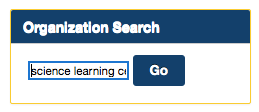
They'll see an "organization search" box at left. Type "physical sciences learning
center"
Click Go.
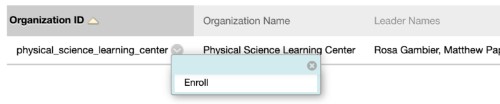
Once the Bb Community name appears, click the drop-down menu to the right of its name.
Select Enroll.
Click Submit.
You are now enrolled and may enter the learning center through the community tab for the rest of the semester.
Locating Tutors
Once students enter Physical Science Learning Center home page they can find tutoring by doing the following:
Follow the link, ‘Click here for tutors’ from the menu on the left.
Find the subject area (Chemistry, Physics, Astronomy, etc) you are seeking help with
and click on the folder.
Within the folder there are options to post to a question board or interact with tutors
directly. Use the question board to post questions that are not urgent in nature. If you. Use this option subscribe to the forum to be notified by email once a response is
posted. Individual tutor sessions are listed directly beneath the question board. Use the listed availabilities to determine the days and times each tutor is available.
After finding a tutor you can meet with click the link provided during their scheduled
time(s) and you will be brought into their Virtual meeting room.
After the page loads, type in your name and click ‘Join Session.’
Once inside the session students are first presented with the opportunity to run through a brief tutorial on how to work within a Collaborate session. After that they
will then be able to work directly with a tutor. Keep in mind that there may be other
students receiving help but tutors will get to each person on a first-come, first-served
basis.
Please be patient. We ask that all students who enter a tutoring session mute their microphones and raise their hand. Once the tutor finishes helping a student they will address each student in order.
Contact Us
Biology Learning Center
William J. Lindsay Life Sciences Building Room 216